NTP
A practical introduction to Network Time Protocol, why accurate time matters in Active Directory environments, how Kerberos depends on clock synchronization, and how enterprise time hierarchy should be designed.
NTP synchronizes system clocks over the network using UDP port 123.
AD authentication is time-sensitive and can fail when clocks drift too far apart.
Enterprise time should flow from trusted sources through a controlled internal chain.
What Is NTP?
NTP stands for Network Time Protocol. It is a networking protocol used to synchronize the clocks of computers, servers, and network devices to a trusted reference time source, usually UTC.
NTP commonly runs over UDP port 123. Its job is simple but critical: keep the clocks across systems close enough that authentication, logging, certificates, scheduled jobs, and distributed applications all behave correctly.
Every server and device has an internal clock. Without time synchronization, those clocks drift. One server may run slightly fast, another slightly slow, and after enough time they can differ by seconds or minutes.
Why Time Accuracy Matters in Enterprise
A clock being a few minutes off might sound harmless, but in enterprise environments it can break critical systems.
Accurate time is a foundation for authentication, security investigations, compliance, certificates, replication, databases, and distributed applications. When clocks disagree, systems that depend on trust and ordering start behaving unpredictably.
Kerberos Authentication
Active Directory uses Kerberos as its default authentication protocol. Kerberos uses timestamps to help prevent replay attacks, so the clocks between clients and Domain Controllers must stay closely synchronized.
The default Kerberos clock tolerance in Windows domains is 5 minutes. If the time difference between a client and the Domain Controller is greater than the configured tolerance, authentication can fail.
Audit Logs and Compliance
During a security incident, investigators often correlate logs from Domain Controllers, servers, firewalls, endpoints, applications, and cloud systems.
If those systems disagree on time, events appear out of order. That makes it difficult to reconstruct what happened, when it happened, and which system was involved first.
Accurate timestamps are also important for compliance and audit requirements. Security records are only useful when their time data can be trusted.
Replication and Databases
Distributed systems often use timestamps to understand ordering, freshness, conflict resolution, and change history.
Active Directory replication, database clusters, file synchronization tools, backup systems, and application platforms all become harder to troubleshoot when clocks are wrong.
Certificates and Encryption
TLS and SSL certificates have validity windows. They are only trusted between specific start and end dates.
If a server clock is wrong, a valid certificate may appear expired or not yet valid. That can break HTTPS, internal APIs, LDAPS, management tools, and encrypted application traffic.
The Stratum Hierarchy
NTP is organized in a layered hierarchy called strata. A stratum represents how many steps a system is away from an authoritative reference clock.
Physical reference clocks such as atomic clocks, GPS clocks, or radio clocks.
NTP servers directly connected to Stratum 0 reference clocks.
Servers that synchronize from higher-level NTP servers and serve time downstream.
Lower stratum generally means closer to the reference clock, but it does not automatically guarantee better time in every situation. Network quality, latency, jitter, and server reliability also matter.
Active Directory Time Hierarchy
In an Active Directory domain, Windows Time Service, also known as W32Time, manages time synchronization for domain-joined systems.
In a typical AD design, the forest root PDC Emulator synchronizes with a trusted external or enterprise time source. Other Domain Controllers and domain-joined clients then follow the domain time hierarchy.
External trusted NTP source
        ↓
Forest root PDC Emulator
        ↓
Other Domain Controllers
        ↓
Member servers and workstationsGood Enterprise NTP Design
A clean enterprise time design should be predictable, redundant, and easy to troubleshoot.
Configure the forest root PDC Emulator to use trusted time sources. Ensure downstream Domain Controllers and clients use the domain hierarchy unless there is a specific reason to configure them manually.
For Linux systems that interact with Active Directory, make sure Chrony or another NTP client follows the same approved time hierarchy. This helps prevent Kerberos issues caused by Linux and Windows systems drifting apart.
Useful Checks
These commands are useful when troubleshooting Windows and Linux time synchronization.
# Windows: show time source
w32tm /query /source

# Windows: show time synchronization status
w32tm /query /status

# Windows: rediscover domain time hierarchy
w32tm /resync /rediscover

# Windows: show domain time hierarchy
w32tm /monitor

# Linux with Chrony: show tracking status
chronyc tracking

# Linux with Chrony: show NTP sources
chronyc sources -v

# Linux: verify UDP 123 listeners
ss -ulnp | grep ':123'
Common Problems
| Symptom | Likely Cause | What to Check |
|---|---|---|
| Kerberos login failures | Client and Domain Controller clocks differ beyond tolerance. | Compare client time, DC time, and domain time source. |
| Logs appear out of order | Servers are using different time sources or drifting. | Check NTP source and offset on affected systems. |
| Certificate errors | System clock is outside certificate validity window. | Check local clock, timezone, and NTP synchronization. |
| Linux AD authentication issues | Linux host is not synchronized with AD time hierarchy. | Check chronyc tracking and configured NTP sources. |
| Domain clients use wrong source | Manual NTP configuration overrides domain hierarchy. | Check Windows Time configuration and policy settings. |
Final Thoughts
NTP is easy to ignore because it usually works silently in the background. But when time synchronization fails, the impact can be immediate and widespread.
In Active Directory environments, time is part of the authentication foundation. Kerberos, logs, certificates, replication, and troubleshooting all depend on systems agreeing on what time it is.
Next, we can cover Windows Time Service in detail, including W32Time, the PDC Emulator, domain hierarchy, and practical troubleshooting commands.
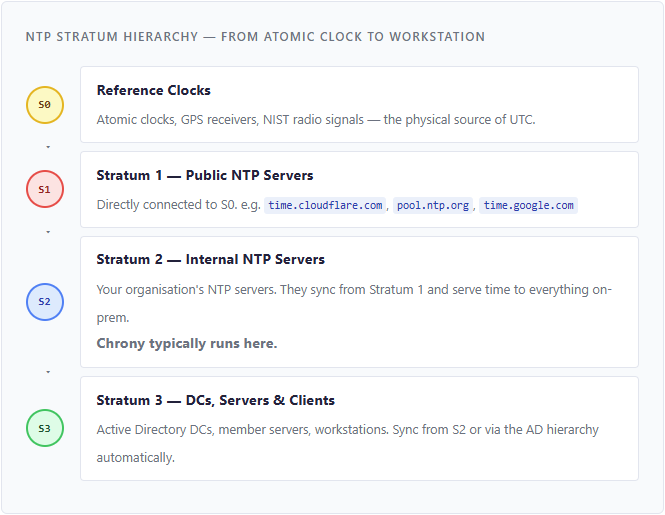
In a well-designed enterprise, only your internal NTP servers (Stratum 2) should reach out to the internet. Everything else syncs internally. This keeps time accurate, reduces external dependencies, and passes security audits.