

What is Chrony?
Chrony is a modern NTP implementation for Linux systems. It is the default NTP daemon on RHEL 7+, CentOS 7+, Rocky Linux, AlmaLinux, Fedora, and Ubuntu 18.04+, replacing the older ntpd.
Think of Chrony as the software that runs in the background on your Linux server, constantly checking the time from upstream NTP sources and making tiny adjustments to keep the local clock accurate.
Why Chrony instead of the older ntpd?
- Faster Initial Sync – Chrony synchronizes the clock much faster after boot or network reconnection — critical for VMs that may have been paused or migrated.
- VM-Friendly – Virtual machines experience significant clock drift when paused, snapshotted, or live-migrated. Chrony handles these jumps gracefully without getting confused.
- Intermittent Network – Works well on systems with unreliable or intermittent network connectivity — it remembers the clock’s drift rate and compensates even when NTP servers are temporarily unreachable.
- Higher Accuracy – Achieves better long-term accuracy than ntpd by tracking the system clock’s natural drift rate (frequency error) and correcting it proactively.
Chrony has two main components: chronyd (the background daemon/service) and chronyc (the command-line tool you use to query and control it).
Chrony Configuration
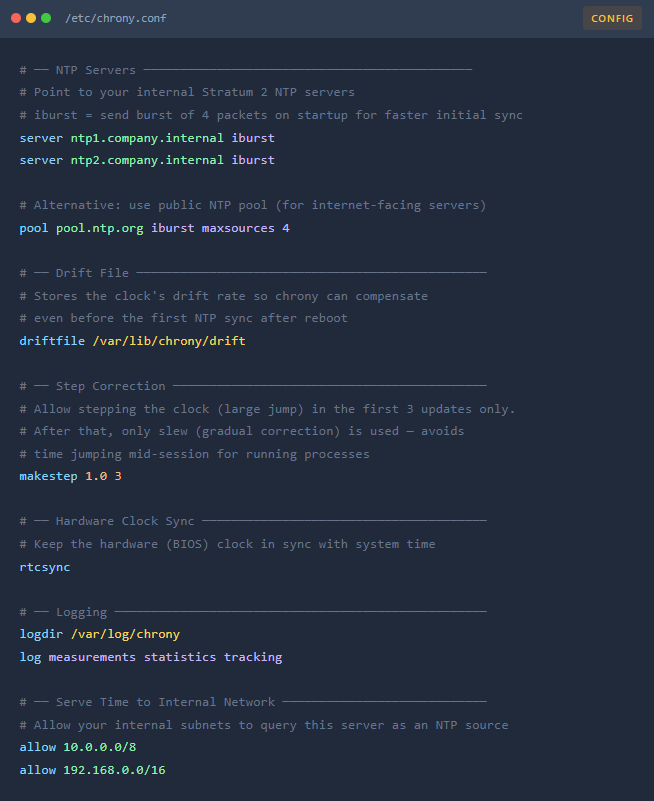
All Chrony configuration lives in one file: /etc/chrony.conf. Below is a typical enterprise configuration with every line explained.
Chrony Commands
- Enable at boot and start immediately systemctl enable –now chronyd
- Force an immediate time sync right now chronyc makestep
- Restart after config changes systemctl restart chronyd
- Check service status systemctl status chronyd
- Chrony Tracking chronyc tracking
- List Chrony NTP Servers chronyc sources
- Show Statistics of Each NTP Source chronyc sourcestats -v
- Check how many NTP sources are currently online chronyc activity
- Real-time watch — refreshes every second watch -n 1 chronyc tracking
- Verify UDP port 123 is open and listening ss -ulnp | grep 123
- Test reachability of an NTP server manually ntpdate -q ntp1.company.internal
- Check firewall allows NTP outbound firewall-cmd –list-all | grep ntp
- If this server SERVES time, see who is querying it chronyc clients
- One-liner health check chronyc tracking && chronyc sources -v
Run chronyc tracking &&chronycsources -v — if you see Leap status: Normal and at least one source marked *, NTP is healthy.
Chrony Cheatsheet
| Symbols | Meaning | Status |
| * | Current best source — where time is actively syncing from. You want exactly one. | ✓ Good |
| + | Good source, combined with primary for better accuracy | ✓ Good |
| – | Source excluded from combination (outlier), not used | ⚠ Acceptable |
| ? | Source unreachable or not yet polled | ✗ Problem |
| x | Falseticker — considered untrustworthy | ✗ Investigate |
| Reach: 377 | All 8 of last 8 polls succeeded (octal 377 = 11111111) | ✓ Full reachability |
| Reach: 000 | Zero successful polls — completely unreachable | ✗ Check network/firewall |
| Symptom | Likely Cause | Fix |
All sources show ? | UDP 123 blocked by firewall | firewall-cmd –add-service=ntp –permanent && firewall-cmd –reload |
| Leap status: Not synchronized | No reachable sources yet; service just started | Wait 1–2 min, or run chronyc makestep |
| Large offset (>1 second) | Clock drifted badly — common after VM resume/snapshot | Run chronyc makestep to immediately step the clock |
Reach: 000 for all sources | DNS not resolving NTP hostnames, or servers are down | Test: dig ntp1.company.internal — verify DNS and NTP server availability |
| Only one source available | Other NTP servers unreachable | Verify /etc/chrony.conf has multiple server lines; check connectivity |
| chronyd won’t start | Config file syntax error | Check journalctl -u chronyd for the exact error line |
| AD Kerberos failures on Linux host | Clock skew >5 min vs Domain Controller | Run chronyc makestep; ensure Linux NTP syncs from same hierarchy as AD |
